


What Does a Security Review Actually Check Before You Can Buy a Learning Platform?
TL;DR
Quick Summary: Learning Platform Security Review
A learning platform security review is the IT and procurement assessment of identity integration, authentication controls, data ownership, and independent audit evidence that must be completed before an organization can purchase training software. It typically adds 2–6 weeks to enterprise deals, plus another 10–21 days when gaps surface late.
5 Key Takeaways:
- Single Sign-On (SSO): Confirm integration with identity providers such as Okta, Microsoft Entra ID, or Google Workspace via SAML 2.0, including just-in-time (JIT) provisioning and automatic access revocation.
- Multi-Factor Authentication (MFA): Verify that MFA can be enforced across all members, since it blocks more than 99% of automated account-compromise attacks.
- Data Ownership & Privacy: Review the vendor's privacy policy for customer data ownership terms and GDPR compliance.
- Independent Audit Evidence: Request a SOC 2 Type 1 or Type 2 report showing that security controls were tested by a third party.
- Buying Committee Readiness: Enterprise purchases now involve 6–8 stakeholders, so having SSO, MFA, SOC 2, and privacy documentation ready before evaluation prevents late-stage stalls.
The LMS security checklist
Security review now adds 2 to 6 weeks to most enterprise software deals, and when gaps like missing LMS SSO or an incomplete SOC 2 report surface late, that delay stretches another 10 to 21 days. If you are choosing a learning platform, the security conversation is not a formality you handle after the demo. It is often the thing that decides whether the deal happens at all.
Most training and L&D teams do not think of themselves as buying a piece of security infrastructure. But the moment a platform touches employee data, member profiles, or single sign-on, procurement and IT treat it exactly like they would treat a CRM or an HR system. Getting ahead of that review before you start evaluating options saves weeks later.
Why this review exists in the first place
The reason security teams have gotten stricter is not paranoia. It is math. Stolen credentials are still one of the most common ways attackers get into a system, showing up as the initial access vector in 22% of breaches, and weak or reused passwords are behind 81% of hacking-related breaches in corporate environments. Any platform that still relies on email and password alone is inheriting that risk on your behalf.
Multi-factor authentication is the single most effective response available. Microsoft's own research found that MFA blocks more than 99% of automated account compromise attacks, even when a password has already leaked. That is why "does this platform support MFA or SSO" has become one of the first questions procurement asks, not a nice-to-have buried on page 40 of a security questionnaire.
Buying committees have grown too. Enterprise software purchases now routinely involve 6 to 8 stakeholders instead of the 1 or 2 who might have picked a tool a few years ago, and a security or IT reviewer is almost always one of them. A learning platform picked by an L&D lead alone often stalls the moment it reaches that reviewer for the first time.
What a security reviewer is actually checking for
Strip away the jargon and a platform security review usually comes down to four questions:
- Can it connect to our identity provider? Enterprise IT wants every login going through Okta, Microsoft Entra, or Google Workspace (what's usually called LMS SSO), not a separate password only the platform manages.
- Is multi-factor authentication available, and can we require it? Optional MFA is a start. Mandatory MFA across every member is what most reviewers actually want to see.
- Who owns the data, and where does it go? This is a data ownership and privacy question as much as a technical one, and it usually leads straight to the vendor's privacy policy.
- Has the vendor been independently audited? A SOC 2 report, even an early-stage one, tells a reviewer that security controls have been tested by someone other than the vendor itself.
Miss any one of these and the conversation shifts from "let's get started" to "let's schedule a call with our security team," which is exactly the 10 to 21 day delay mentioned above.
How Disco solves this
Disco is built to clear this checklist before a security reviewer ever asks.
Single sign-on.
This is often called LMS SSO, and it's usually the single fastest way to clear a security review. Enterprise SSO connects Disco directly to Okta, Microsoft Entra, Google Workspace, MiniOrange, or any SAML 2.0 compatible identity provider. Setup runs through a guided wizard: connect the identity provider, configure the connection, test it with a live login, then enable it. Once enabled, every login for every member runs through the organization's own IdP, and IT keeps centralized control over who has access, including automatic revocation when someone leaves the directory. Admins can also set session length and turn on just-in-time provisioning, so new members are created automatically the first time they authenticate.
Two-factor authentication.
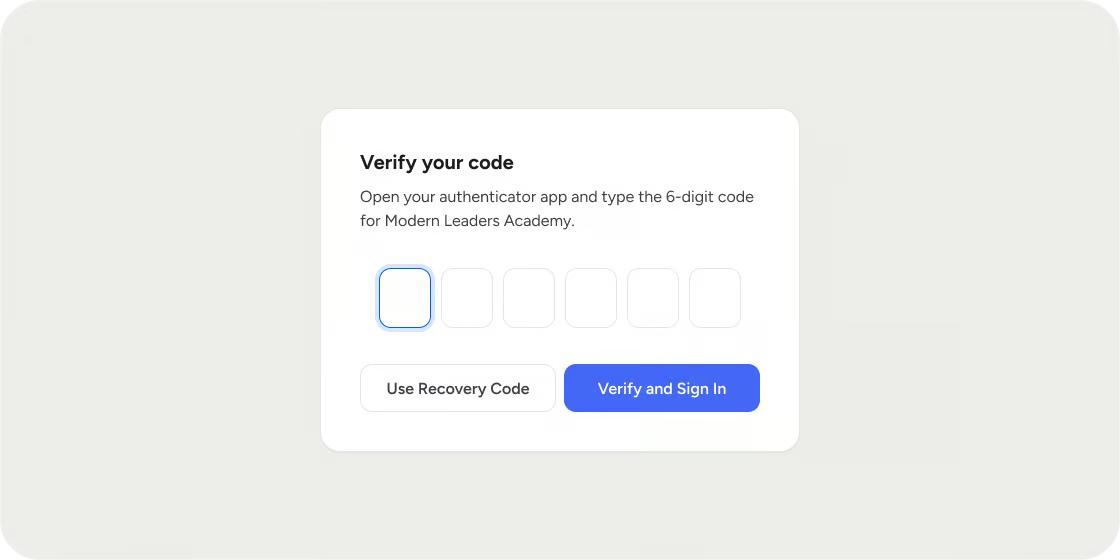
For academies that are not yet on SSO, Disco supports time-based one-time password 2FA through any standard authenticator app, including 1Password, Authy, Google Authenticator, and Microsoft Authenticator. There is no SMS option, since SMS is the weaker of the two methods. Admins can require 2FA across the whole academy rather than leaving it optional, and the members list shows exactly who has enrolled, so nothing gets left to chance during rollout.
SOC 2 and data ownership.
Disco is SOC 2 Type 1 compliant as of January 2026 and is currently working toward Type 2. Every organization retains full ownership of the content and data inside its academy. Disco is also fully GDPR compliant, with the specifics of data handling and protection practices detailed in the Disco privacy policy, which is usually the first document a security reviewer asks for anyway.
Put together, that means the four questions above have straightforward answers before the conversation even reaches IT: yes to SSO, yes to enforced MFA, a documented SOC 2 report, and a clear data ownership and privacy policy to hand over on request.
Get ahead of the review, not behind it
The teams that move fastest through a security review are not the ones with the most impressive feature list. They are the ones who already know the answers to the four questions above before anyone asks. If you are about to start evaluating a learning platform, pull those answers together first. It is a lot easier to hand a reviewer a clean checklist upfront than to explain, three weeks into a stalled deal, why single sign-on was never on the roadmap.
LMS security FAQs
What is LMS SSO?
LMS SSO is single sign-on for a learning platform: instead of a separate email and password just for the platform, members authenticate through your organization's existing identity provider, like Okta, Microsoft Entra, or Google Workspace. It means IT keeps centralized control over who has access, including automatic revocation when someone leaves the company.
Why does a security review take so long for a learning platform?
Because a security reviewer is checking the same things they'd check for any system that touches employee data: identity provider integration, enforced multi-factor authentication, data ownership and privacy terms, and independent audit evidence like a SOC 2 report. If any of those answers aren't ready, the review stalls while someone tracks them down, which is where the 2 to 6 week delay comes from.
Is two-factor authentication the same as SSO?
No. Two-factor authentication adds a second verification step on top of a platform's own login. Single sign-on replaces that login entirely, routing authentication through your organization's identity provider instead. Most platforms support both, since 2FA is what accounts use before an academy is ready to configure SSO, or for organizations that don't use an enterprise identity provider at all.
What is a SOC 2 report, and why does IT ask for one?
A SOC 2 report is an independent audit of a vendor's security controls, covering things like data handling, access controls, and system monitoring. IT asks for it because it's third-party verification rather than a vendor's own claims about their security practices, which is exactly the kind of evidence that lets a security reviewer sign off faster.
Do I need SSO if my team is small?
Not necessarily. SSO becomes valuable once you have an identity provider you want every tool routed through, which is more common as a company grows or as more systems touch sensitive data. Smaller teams can often rely on enforced two-factor authentication as a strong baseline until SSO becomes a real requirement from IT or a customer's own security review.


